
Clinic appointment management: A setup guide
Running a clinic takes serious operational discipline alongside patient care. Directing the right patient to the right time slot, making sure the booked appointment actually happens, and sustaining this whole process without adding workload for staff is a shared concern for every setup, from the single doctor at a small clinic to a multi-branch polyclinic.
6 April 20266 min read
In this article
- Why is clinic appointment management critical?
- Manual and AI-assisted appointment creation with Flextell
- Appointment statuses in Flextell: The process is tracked from start to finish
- AI reminder system: The most practical way to reduce no-shows
- Overlap prevention: The system won’t allow it
- Calendar views: The day, the week, the month at a glance
- Appointment management and patient tracking work together in Flextell
- Frequently asked questions
- Appointment management is the cornerstone of the clinic
Appointment management sits at the center of this process. Calendar overlaps, appointments that never get a reminder, requests that go unanswered, and wasted slots are the unavoidable results of manual processes. Flextell moves this entire process into a digital, automated structure: from creating appointments manually in the panel to booking appointments automatically 24/7 through the AI assistant, from automatic reminder messages to overlap prevention, every step runs on a single platform.
In this guide we walk step by step through how Flextell’s appointment management works.
Try Flextell appointment management for free →
Why is clinic appointment management critical?
Appointment management is the point where clinic operations intersect directly with revenue and efficiency. The doctor’s time, staff’s work plan, and the clinic’s calendar occupancy rate depend on how well the appointment process is managed.
With manual processes, keeping this balance gets harder as the clinic grows. Phone records and paper notebooks keep the margin for error high; calendar overlaps and communication breakdowns become unavoidable. A digital appointment system brings these variables under control: who has an appointment, when, and with which doctor is always clearly visible, and the process is managed automatically.
Manual and AI-assisted appointment creation with Flextell
Manual appointments from the panel
A manager or assistant can create a new appointment directly from Flextell’s appointment screen. The patient’s name and phone number, treatment type, doctor selection, and time are entered; at this point the system automatically runs two checks.
The first is whether the selected doctor is available at that time. The second is whether the requested time falls within the clinic’s working hours. If either condition isn’t met, the system doesn’t create the appointment and shows a warning. This blocks calendar overlaps and after-hours appointments from the start.
Automatic appointments through the AI assistant
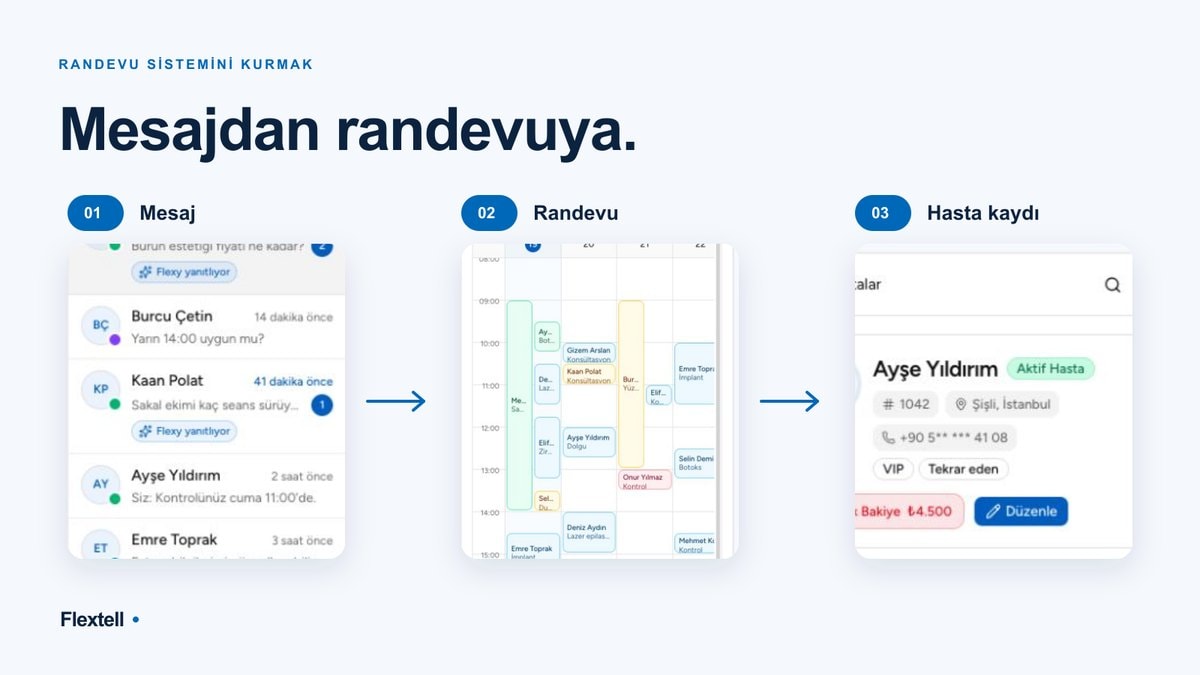
When a patient sends a message over WhatsApp, Instagram DM, or Telegram, Flextell’s AI assistant steps in. Without any human intervention, the assistant understands the patient’s request, identifies the right treatment and doctor, offers available times, and saves the appointment to the system once confirmation is received.
This process runs 24/7. A question like "Can I book an appointment for tomorrow morning?" arriving at 23:00 doesn’t go unanswered. When staff arrive in the morning, they find not a pile of messages but a list of processed and confirmed appointments.
In both methods, the same overlap and working-hours checks apply; the system enforces these rules on appointments that come in through AI just as it does on manual entries.
Appointment statuses in Flextell: The process is tracked from start to finish
In Flextell, every appointment is in one of six statuses. These statuses reflect the appointment’s current stage and provide visibility across the clinic.
Pending: The appointment has been created but not yet confirmed. Requests that come in through the AI assistant initially show up in this status.
Confirmed: The appointment has been verified by the patient or staff. Reminder messages are triggered for appointments in this status.
Canceled: The appointment was canceled by the patient or the clinic. The canceled slot automatically becomes available on the calendar and opens up for new appointments.
Rejected: The appointment request was not accepted by the clinic.
Completed: The patient came to the clinic and the appointment took place. The payment and invoice flow starts from this stage.
No-show: The appointment time passed and the patient didn’t come. This is reflected in the reporting module; which hours and treatments have a high no-show rate becomes analyzable over time.
Transitions between these statuses can happen both manually and automatically. When the appointment time has come and gone and the patient hasn’t been checked in, the system updates the status automatically.
AI reminder system: The most practical way to reduce no-shows
A patient forgetting their appointment means the clinic wastes that slot. The solution is actually simple: send a reminder message at the right time on the right channel.
In Flextell, automatic reminders kick in as soon as an appointment is confirmed. How many hours or days before the appointment the message is sent can be set according to the clinic’s preference; for example, two separate reminders can be set up, 3 days before and 24 hours before the appointment.
Reminder messages are sent over the patient’s preferred channel: WhatsApp, Telegram, or another active communication channel. The message content can be customized; details such as the date, time, and doctor’s name are added automatically.
After receiving the message, the patient can make a cancellation or change request. This request reaches the AI assistant, which manages the process from the start, and the freed-up slot becomes available on the calendar again. Staff don’t need to check messages one by one.
Would you like to learn more about how the automatic reminder system lowers the no-show rate? You can find our detailed guide to the patient appointment reminder system here.
Overlap prevention: The system won’t allow it
Entering two appointments for the same doctor at the same time on the clinic calendar is a small but costly mistake. This risk grows especially at clinics where several people enter appointments into the system.
Flextell solves this problem not with a rule but with a block. The system technically doesn’t allow a new appointment to be entered in a slot that overlaps an existing one. This rule works for manual entries and for appointments that come in through AI.
If the doctor’s personal Google Calendar or Outlook is connected to Flextell, this check becomes even more comprehensive. If a slot is blocked on the doctor’s calendar, Flextell doesn’t show that slot as available. For details, you can look at our Google and Outlook calendar integration guide here.
Calendar views: The day, the week, the month at a glance
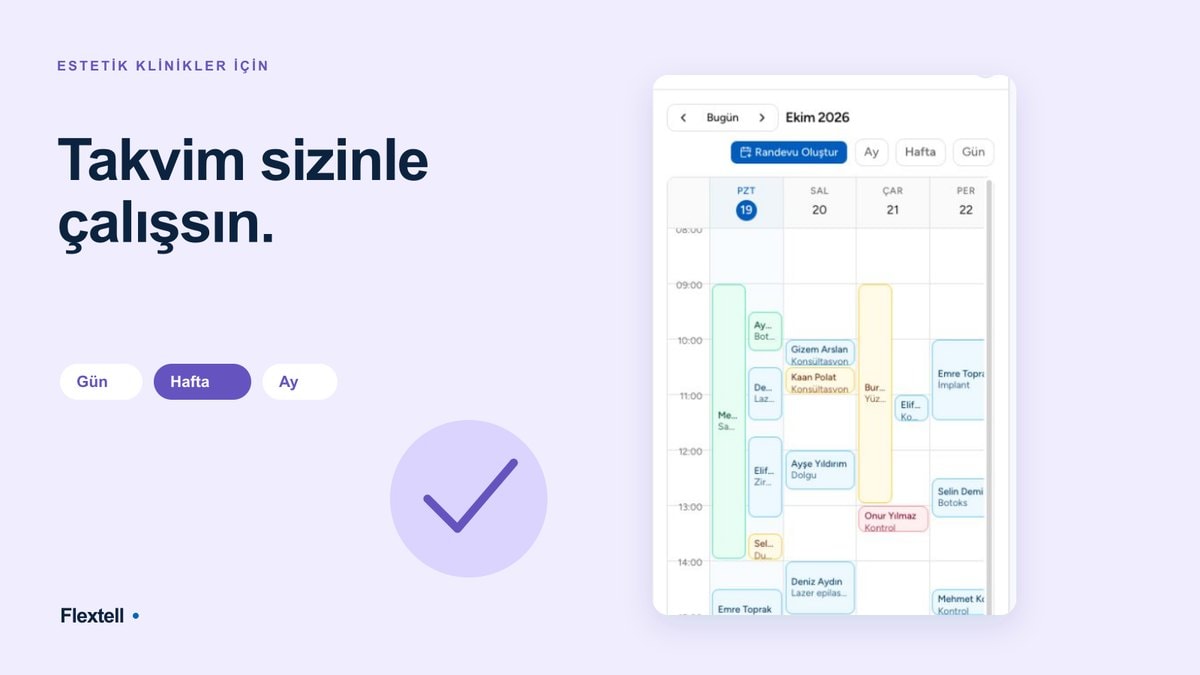
In Flextell, the clinic calendar can be used in three different views: daily, weekly, and monthly. Each view answers a different planning need.
The daily view lists all of that day’s appointments in time order, giving staff who arrive at the clinic in the morning a clear agenda. The weekly view shows busy and open hours through the week together, making planning decisions easier. The monthly view shows the overall occupancy rate; which days are full and which are open is clear at a glance.
Users in the manager role can see all doctors’ appointments side by side on a single calendar screen; this lets you follow the clinic’s overall occupancy in real time, quickly spot open slots, and manage coordination between doctors much more easily.
For more information on calendar views, you can look at our clinic calendar management guide here.
Appointment management and patient tracking work together in Flextell
When you create an appointment, Flextell shows that patient’s history on the same screen. Which treatments they’ve had before, how many appointments they’ve completed, any notes: all of this can be reached from one screen.
This feature saves time and also improves the patient experience. Staff don’t have to identify the patient from scratch every time.
Would you like more information on how patient tracking and past records are managed? You can find our detailed guide on patient tracking software here.
Frequently asked questions
Do I need technical knowledge to create appointments in Flextell?
No. Creating an appointment from the panel is just filling in a few fields. Appointments that come in through the AI assistant are processed automatically anyway; staff don’t need to take any step.
What happens if an appointment is entered outside working hours?
The system shows a warning and doesn’t allow the appointment to be created. Working hours are set in Flextell’s settings; holidays and special closed hours can also be defined.
Can the same patient be given several appointments in a row?
Yes. Especially for multi-session treatments (such as laser hair removal or physical therapy), the session plan module steps in; the dates of subsequent sessions are calculated by the system and created automatically.
You can find our detailed guide on treatment and session plan management here.
When an appointment is canceled, does the freed-up slot open to someone else?
Yes. The slot of a canceled appointment automatically becomes available and shows up on the calendar for new appointments.
Which channels can the AI assistant book appointments from?
It can process messages from WhatsApp, Instagram DM, and Telegram. Appointment requests from all of these channels are managed from a single panel.
Appointment management is the cornerstone of the clinic
A well-managed appointment system puts the rest of the clinic in order. The doctor doesn’t wait around needlessly, staff don’t wrestle with a pile of messages, and patients get reminded without having to ask. These may look like small gains on their own, but together they directly determine the quality of the clinic experience.
In Flextell, appointment management works as an integrated system with calendar views, automatic reminders, overlap prevention, and the AI assistant.
If you’d like to see how all these modules work together, you can look at our clinic management software guide here.
This content was prepared by the Flextell team. Last updated: April 2026.