
Clinic e-Invoice integration: A guide to automatic invoicing
Clinic invoicing is often managed as two separate jobs: close the appointment, then open the invoice screen. Patient details are entered again, a document type is chosen, and the invoice is sent. Each of these steps looks small, but repeated dozens of times a day they eat up staff time and set the stage for invoices that are missed or left incomplete.
17 April 20266 min read
In this article
- E-Invoice obligations for clinics in Turkey
- How does e-Invoice integration work?
- How is an invoice created in Flextell?
- What is on the invoice screen?
- Foreign currency invoices and installment transactions
- Financial tracking by patient
- How does e-Invoice integration work together with the clinic modules?
- Frequently asked questions
- The invoice is now part of the appointment
In Turkey, e-Invoice, e-Archive, and e-SMM (e-receipt for self-employed professionals) obligations apply to clinics directly. Flextell builds this process into the appointment flow through its integration with e-invoice providers. When an appointment is completed, the system creates the invoice automatically and sends it to the provider. Staff don’t need to take any extra step.
In this guide we cover how e-invoice integration works in Flextell, which document types it covers, and how invoices are managed.
E-Invoice obligations for clinics in Turkey
In Turkey, e-Invoice, e-Archive, and e-SMM obligations apply to clinics directly. Depending on the thresholds and activity types set by the Revenue Administration (GİB), clinics may have to use one or more of these document types.
The basic difference between the three document types is this: e-Invoice is used for transactions between registered taxpayers. e-Archive is the electronic issuance of an invoice to the end consumer, meaning the patient. e-SMM is the self-employed professional’s receipt; doctors who practice independently in their own name use this document type.
Which document applies varies with the type and size of the clinic. Flextell supports all three; you can work with the document type that matches your clinic’s needs.
How does e-Invoice integration work?
Flextell runs e-invoice processes through its integration with the leading e-invoice providers in Turkey. A connection can be set up with the provider the clinic already uses or prefers; Flextell is not tied to any particular provider.
Once the integration is set up, the process works like this: when an appointment is completed or a sale is recorded, Flextell automatically creates the relevant invoice and sends it to the selected provider. Staff don’t need to enter invoice details separately or send the document from a separate system. The process is completed inside Flextell, in the background.
In practical terms for the clinic: by the time the patient has paid and left, the invoice has already been issued, sent by the system, and is visible on Flextell’s invoice screen.
How is an invoice created in Flextell?
In Flextell, invoices can’t be created manually by the user. The invoice is generated automatically by the system when certain actions are triggered, such as completing an appointment or recording a sale.
This structure gives the clinic two concrete benefits.
First, information inconsistencies disappear. The patient name, treatment information, and amount in the appointment record appear the same way on the invoice. When there is no need to enter information twice in two different systems, the margin for error goes away too.
Second, an invoice is never forgotten. Staff don’t need to check "Did I issue the invoice?" after an appointment is closed; when the triggering action happens, the invoice has already been created.
What is on the invoice screen?
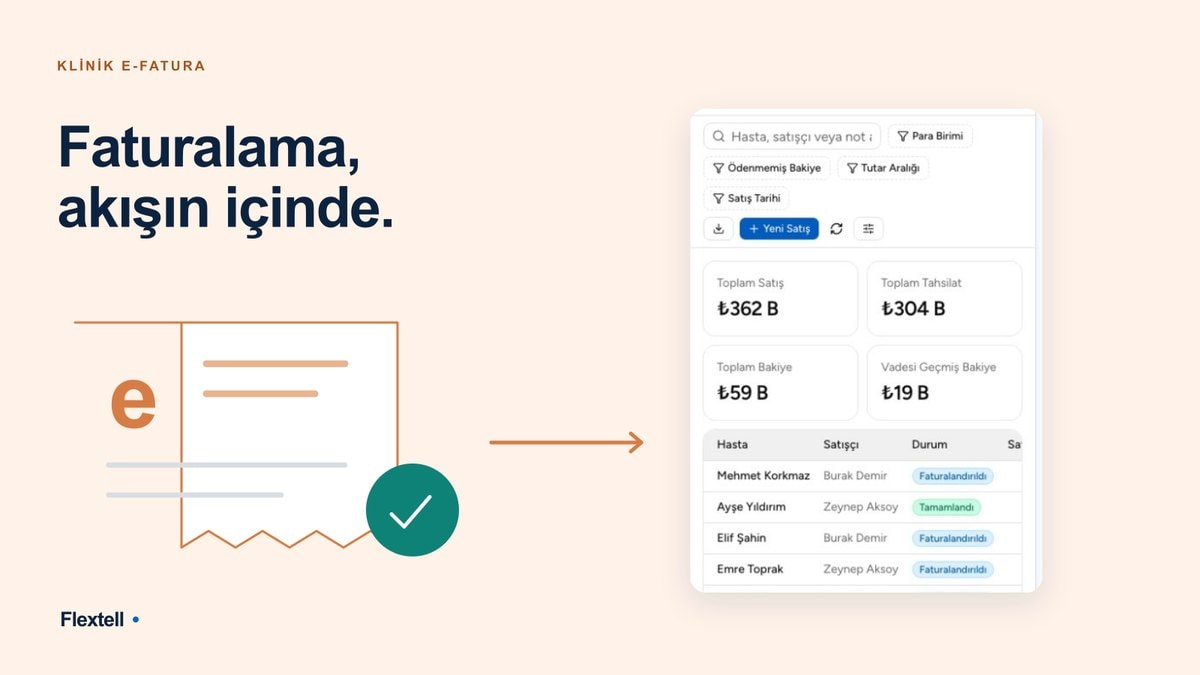
The invoice screen in Flextell is the section where all of the clinic’s electronic invoices are monitored and managed in one place. Each invoice row shows the following: the recipient (patient name and ID details), the document number, the invoice status, the e-invoice provider account it is tied to, the issue date, and the amount payable.
The invoice status appears as a colored badge; stages such as draft, sent, and canceled can be followed instantly this way.
Four filters work on the screen: you can narrow by status, by document type (e-Invoice, e-Archive, e-SMM), by customer, and by archive status. At clinics where dozens or hundreds of invoices accumulate, these filters speed up finding the invoices of a particular patient or a particular period.
What can you do for each invoice?
Each invoice row has several actions.
Send email: Sends the invoice PDF as an attachment to the email addresses you specify. You can enter more than one address.
Download PDF: Downloads the invoice as a PDF document. It can be used to send to the patient or to keep in the clinic’s own archive.
Archive: Moves the invoice to the archive. It’s a practical step for clearing completed invoices from the list without deleting them from the records.
Download XML: Downloads the XML file in UBL-TR format. It’s useful when you need to transfer data to accounting software or external systems.
Preview: Opens a visual preview of the invoice in the browser. It’s used to check how the invoice looks before or after sending.
Check status: Pulls the invoice’s current status from the provider. It’s used after sending to verify whether the other party has received the invoice.
Foreign currency invoices and installment transactions
Flextell supports foreign currency invoices. On invoices issued for foreign patients or patients paying in foreign currency, the amount is shown in both the original currency and its Turkish lira equivalent.
For installment payments, an invoice can be split into 2 to 12 installments. From the start date you set, the system automatically creates a monthly installment plan and generates a separate record for each installment. At clinics where session package sales are common, this structure keeps both the clinic’s revenue tracking and the patient’s payment plan transparent.
Financial tracking by patient
Invoice management in Flextell isn’t limited to issuing documents. Each patient’s financial activity (sales invoices, payments received, payments made, and the opening balance) is tracked patient by patient on a separate screen.
When you create a new appointment or view a patient’s record, you can reach past payments, issued invoices, and any outstanding balance from the same screen. There’s no need to switch to a separate accounting screen or open a different application.
This tracking matters more as the clinic grows. With hundreds of active patients, instead of managing each one’s financial status from a separate spreadsheet, reaching the financial summary inside the patient card with one click saves time and lowers the risk of error.
Would you like to explore every dimension of the patient record? You can find our detailed guide on patient tracking software here.
How does e-Invoice integration work together with the clinic modules?
Flextell’s e-invoice module doesn’t work apart from the rest of the platform. When an appointment is completed, the invoice is created automatically, linked to the relevant patient card, and added to the financial transactions section. The treatment note, the patient file, and the invoice are all kept linked to the same appointment; information doesn’t scatter or get lost.
In multi-doctor or multi-branch clinics, this integrated structure becomes even more noticeable. Invoices generated from different doctors’ appointments appear on a single screen and can be quickly separated with filters. The clinic owner or accountant can see all invoices for a given day or week, with their statuses, at a glance.
Would you like to see how all of Flextell’s modules work together? You can find our guide to clinic management software here.
Frequently asked questions
Which e-Invoice document types does Flextell support?
Three document types are supported: e-Invoice, e-Archive, and e-SMM. You can work with the document type that fits the clinic’s activity structure and obligations.
Do I have to enter details by hand when creating an invoice?
No. Invoices are created automatically by the system; it’s enough for the appointment or sale record to be triggered. The patient name, amount, and treatment information are carried over from the record in Flextell to the invoice automatically.
Which e-Invoice providers can I use?
Flextell is not tied to a particular provider. A connection can be set up with the e-invoice provider your clinic prefers. Once the provider details are defined in Flextell, the system becomes active. The Flextell team supports you during setup.
Can I edit an invoice after sending it?
No. Once an invoice is issued, its line items and amounts can’t be changed. Sending an invoice is an irreversible action; if there is an error, it has to be handled through the cancel action.
Can I download my invoices as PDF?
Yes. The PDF download action is always available for every invoice. You can also download in XML format; this file can be used to transfer data to external accounting software.
Can foreign currency invoices be issued for foreign patients?
Yes. On foreign currency invoices, the amount is shown in both the foreign currency and its Turkish lira equivalent.
How is the invoice issued for patients who pay in installments?
When creating a sale in Flextell, you can choose a plan of 2 to 12 installments. The system automatically creates a record for each installment and spreads them at monthly intervals; installment tracking can be done from the patient transactions screen.
How do I know if an e-Invoice failed to send?
The status of each invoice appears as a badge on the invoice screen. After sending, the "Check status" action pulls the current status from the provider so you can verify whether the invoice was delivered.
The invoice is now part of the appointment
For a long time, clinic invoicing was managed as two separate steps: first the appointment, then the invoice. The handoff between those two steps took time and was a link that was sometimes skipped.
In Flextell, e-invoice integration combines these two steps. When the appointment is closed, the invoice is generated automatically by the system, sent through the provider, and can be tracked on the invoice screen. This link in the accounting process is built into the clinic platform; staff don’t need to take a separate step.
If you’d like to see how Flextell would work in your clinic, you can request a demo or start a free trial right away.
This content was prepared by the Flextell team. Last updated: April 2026.