
10 questions to ask when choosing clinic software
Choosing clinic software is a far more critical decision than it looks. A wrong choice slows down daily operations, scatters patient data, and buries the team’s time in routine tasks. The right choice does the opposite: it supports the clinic’s growth, directs staff’s energy to the work that really matters, and improves the patient experience for good.
8 April 20268 min read
In this article
- Question 1: Does the AI assistant really work 24/7?
- Question 2: Which communication channels does it support?
- Question 3: Can I move my existing patient data into the software?
- Question 4: Can it track multi-session treatments automatically?
- Question 5: How does it prevent calendar overlaps?
- Question 6: What does it do to lower the no-show rate?
- Question 7: Does it automate e-invoicing and accounting?
- Question 8: How can I measure my clinic’s performance?
- Question 9: Can I manage staff with different permissions in the same system?
- Question 10: How are security and KVKK compliance ensured?
- Evaluate the 10 questions together
There are dozens of clinic software options on the market. All of them have similar interfaces, and all of their landing pages look appealing. What reveals the difference is asking the right questions.
In this guide we walk step by step through the 10 questions you should really be looking for answers to when evaluating clinic software, and the reason behind each one.
Question 1: Does the AI assistant really work 24/7?
Many clinic software products lead with the promise of being "AI-powered" or offering "automatic replies." But to tell whether this feature really delivers value, you need to ask: does this system work nonstop outside working hours, on weekends, and on holidays too?
A significant share of a clinic’s patient traffic happens after hours. If an evening message like "Can I book an appointment for tomorrow?" goes unanswered until morning, that patient has probably turned to another clinic.
The AI assistant in the software you’re evaluating should be able to take appointment requests, answer treatment and price questions instantly, and hand the process over to staff when human intervention is needed. All of this should work regardless of the hour.
Flextell’s AI assistant handles patient messages from WhatsApp, Instagram DM, and Telegram at every hour of the day; it books appointments, gives information, and hands over to staff when needed.
Learn how the AI assistant works in your clinic →
Question 2: Which communication channels does it support?
Patients use different platforms to reach the clinic. One patient writes on WhatsApp, another on Instagram DM, another on Telegram. Software that supports only one channel doesn’t solve this scatter; it just moves it.
The right question is this: can you see messages from all channels in a single panel? Does the AI assistant work on every channel at the same time? When a channel is turned off or its connection drops, does the system warn you?
A single inbox view is the basic condition for the clinic to keep control of its communication. As the number of channels grows, so does the cost of missed messages.
Question 3: Can I move my existing patient data into the software?
One of the biggest worries about switching clinic software is what happens to years of accumulated patient data. Entering this data from scratch is a waste of time and raises the margin for error.
The software you’re evaluating should answer these questions clearly: Which data types can I import from my current system? Patient records, appointment history, treatment information, sales and invoice data: can all of them be imported? What safeguards are there against data loss during the transition?
Flextell’s import module supports a wide range of data, including patients, appointments, treatments, products, sales, accounting transactions, and invoices. The import runs in the background; progress can be followed live. Thanks to duplicate record checking, the risk of overwriting existing data also goes away.
Get more information about patient data import and the transition process →
Question 4: Can it track multi-session treatments automatically?
This question is critical for clinics that offer multi-session treatments such as laser hair removal, physical therapy, skin care, and orthodontics. Calculating the interval between sessions by hand, noting the next appointment date separately, and sending reminders manually is a process that takes time and has a high margin for error.
Good clinic software should automatically calculate when the second session should happen once the first is complete, find the right date on the calendar, and send the patient a session confirmation message. When the patient confirms the message, the appointment should be entered in the system, with no extra step for staff.
In Flextell, a session plan is defined for each treatment: how many sessions, how many days between sessions, how much flexibility. When a session is completed, the system calculates the date of the next one, finds an available slot, and sends the patient a session confirmation message over WhatsApp. Once the patient confirms, the appointment is automatically entered in the calendar.
Question 5: How does it prevent calendar overlaps?
Two different appointments being entered for the same doctor at the same time is a common problem, especially at clinics where several people access the system. The fix for this problem is not a warning message but a technical block.
The software’s overlap prevention mechanism should answer these questions: Does the system technically allow a new appointment on a taken slot? Does a block on the doctor’s personal calendar (Google Calendar or Outlook) show up on the clinic calendar? Does the same check apply to appointment requests that come in through the AI assistant?
In Flextell, this check applies equally to manual entries and to appointments that come in through the AI assistant. A slot blocked on the doctor’s Google Calendar or Outlook calendar isn’t shown as available in Flextell, which gives overlap protection from both directions.
See the clinic calendar management guide →
Question 6: What does it do to lower the no-show rate?
A patient who is expected and doesn’t come means the clinic wastes that slot entirely. The most practical way to lower the no-show rate is to send a reminder message at the right time on the right channel. But managing this process by hand puts a serious operational load on even small clinics.
The software you’re evaluating should send automatic reminders before appointments, let you customize reminder timing, and automatically make the freed-up slot available when a cancellation request comes in. Beyond that, it should also send a follow-up message to win back a patient who cancels after a set period.
In Flextell, the appointment reminder system works for three separate scenarios: a reminder before the appointment (timing can be customized), a win-back message a set number of days after an appointment is canceled, and an automatic confirmation message for the next session in multi-session treatments. When these three mechanisms work together, the number of wasted slots drops meaningfully.
Question 7: Does it automate e-invoicing and accounting?
In Turkey, e-Invoice, e-Archive, and e-SMM (e-receipt for self-employed professionals) obligations apply to clinics directly. Managing these processes with separate accounting software or manual entry wastes time and leaves the link between appointment and invoice broken.
When an appointment is completed, the invoice should be created automatically, sent to the right provider, and linked to the patient history. Without this integrated structure, the clinic has to enter the same information into several systems.
In Flextell, invoices are generated automatically by the system; all of the e-Invoice, e-Archive, and e-SMM document types are supported. Thanks to connections with the leading e-invoice providers in Turkey, invoice processes are managed from a single platform. Each invoice’s preview, PDF download, and sending history are kept on the same screen.
Question 8: How can I measure my clinic’s performance?
You need data to know whether the clinic is really doing well. But collecting this data from several systems and putting it into Excel both delays decisions and makes them prone to errors.
Good clinic software should answer these questions: Are metrics such as appointment occupancy rate, no-show distribution, revenue by treatment, and staff productivity calculated automatically? Can reports be exported as PDF? Can automatic reports be scheduled on a daily, weekly, or monthly basis?
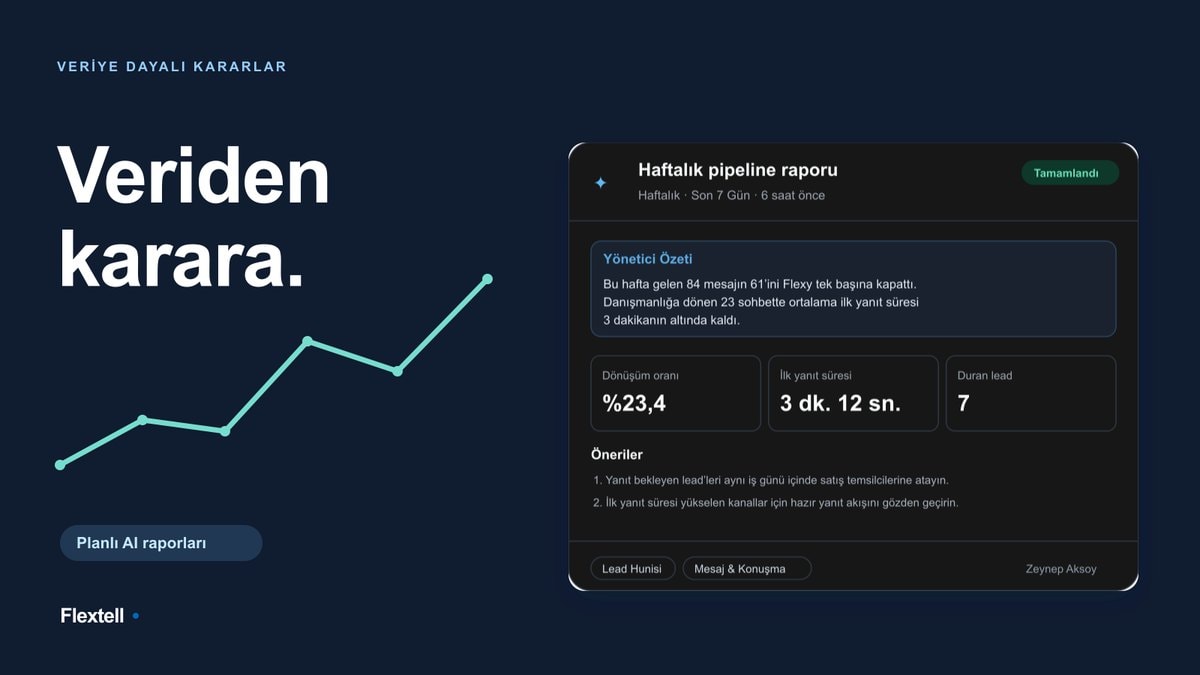
Flextell’s AI-powered reporting module collects data from 10 different system sources, including appointments, patients, treatments, doctors, messaging, and support requests, analyzes it with AI, and turns it into an annotated report. The report doesn’t just summarize the past; it also offers takeaways and actionable recommendations for clinic management.
See the guide to clinic reporting and AI analytics →
Question 9: Can I manage staff with different permissions in the same system?
The clinic owner, doctor, assistant, and receptionist use the same system, but what each of them should see and be able to do is different. Giving everyone the same access weakens data security and also leads staff to run into information they don’t need.
The software you’re evaluating should define access levels per user, offer a tailored interface for each role, and not require technical knowledge to manage this structure.
In Flextell, doctor, assistant, and manager roles are defined separately. Each user can access only the modules and pages assigned to their role. The doctor’s biography is also read by the AI assistant; the assistant learns which doctor performs which treatment from this information and routes patients correctly. The role structure both improves data security and protects staff’s focus.
Get more information about doctor and assistant management →
Question 10: How are security and KVKK compliance ensured?
Patient data counts as personal data under KVKK (Turkey’s Personal Data Protection Law), and storing this data in secure environments is a legal requirement. When choosing clinic software, the questions you ask on this subject matter not only technically but legally.
The software you’re evaluating should answer these questions clearly: Is the data stored on encrypted servers? Is there a control mechanism that prevents unauthorized access? Does the system keep a record of who did what and when?
In Flextell, patient data is hosted on encrypted servers with access control. The role-based permission system prevents unauthorized users from accessing patient information. The activity log system records every action on the clinic with a timestamp: who changed which appointment, which patient record was updated, which payment was entered and when. This transparency is a critical safeguard both for internal audit and for after-the-fact verification in any dispute.
Evaluate the 10 questions together
These 10 questions have a common denominator: all of them focus on points that directly affect the clinic’s daily operations. Whether the AI really works 24/7, whether overlaps are technically blocked, whether data migration is safe, or whether KVKK compliance is really met: all of these can be tested not just with a feature list but by actually using the system.
Flextell is designed so that clinics can give a concrete answer to all of these questions. With its integrated structure running from appointments to e-invoicing, from the AI assistant to inventory tracking, it lightens the clinic’s operational load and improves the patient experience.
To look more closely at all the modules of clinic software and how they work together, you can check our complete clinic management software guide. Or you can start a free trial to test the system directly in your own clinic setup.
This content was prepared by the Flextell team. Last updated: April 2026.